Posts

Showing posts with the label tricks

Top 10 Facebook Tricks that will Amase you as a Guru

Image
Facebook is the world’s second most visited website and the world’s most popular social media. It has become a necessity of today’s social media connected world. In this article, you will learn some esoteric Facebook tricks which will transform you from a regular Facebook user to a Facebook wizard. Let’s dive straight into Facebook wizardry! 1. Create Up-side-Down Facebook Updates Go to Up-side-Down , Enter your post there in the top most box and you’ll get the upside version in the below box, copy the text there and post the status to your Facebook profile, I am sure, your friends will tilt their head trying to read it! 2. Turn off Autoplay videos When you scroll your news feed, you’ll see videos starts playing automatically,  Are you crazy! you are losing your Internet data (Ignore Jio users), so just follow these steps to stop Facebook autoplay videos on PC, Android, and iPhone. 3. Customize your online status  Many of us have friends we don’t want to talk to at the time. Y...
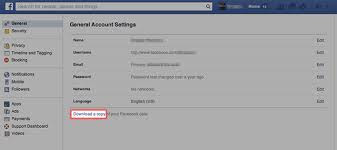
How to Backupall your Facebook Files like chats, photos,videos to your Device

Image
Facebook may not be your main photo storage solution (at least we hope it’s not), but knowing how to download a backup of all the photos and videos you’ve uploaded to and shared through the service is still a useful skill to keep tucked away in your Internet toolbox. Fortunately, the social network actually has a very straightforward, secure and simple system in place so you can download a backup of all your photos, videos, messages and posts in just a few simple steps. First you need to go to your Facebook Settings where you should be greeted by a page that looks like this: From there, click on the ‘ Download a copy ’ hyperlink at the bottom to begin the process. Once you do, you’ll be redirected to the screen shown below where you’ll click on ‘ Start My Archive ’: Then, once you’ve verified your identity by reentering your password, you’ll click through a couple of more dialog boxes to confirm before receiving an email that looks something like this: It’s smooth sailing from that p...